Endstep Extension

Endstep Extension

Track the hand, the storm and the top deck.

An unofficial companion extension for endstep.cc, the online Magic: The Gathering client. It is not affiliated with, endorsed by or made by endstep. It adds a small dock with an opponent hand tracker, a storm counter and a top deck tracker, in live games and in the replay viewer. It also records the games you play and keeps your match history, in your browser.

A full game, start to finish

One real game replayed end to end, sped up about twice, with the dock following every turn: the opponent's hand, the storm count and the top of your library.

From a real game

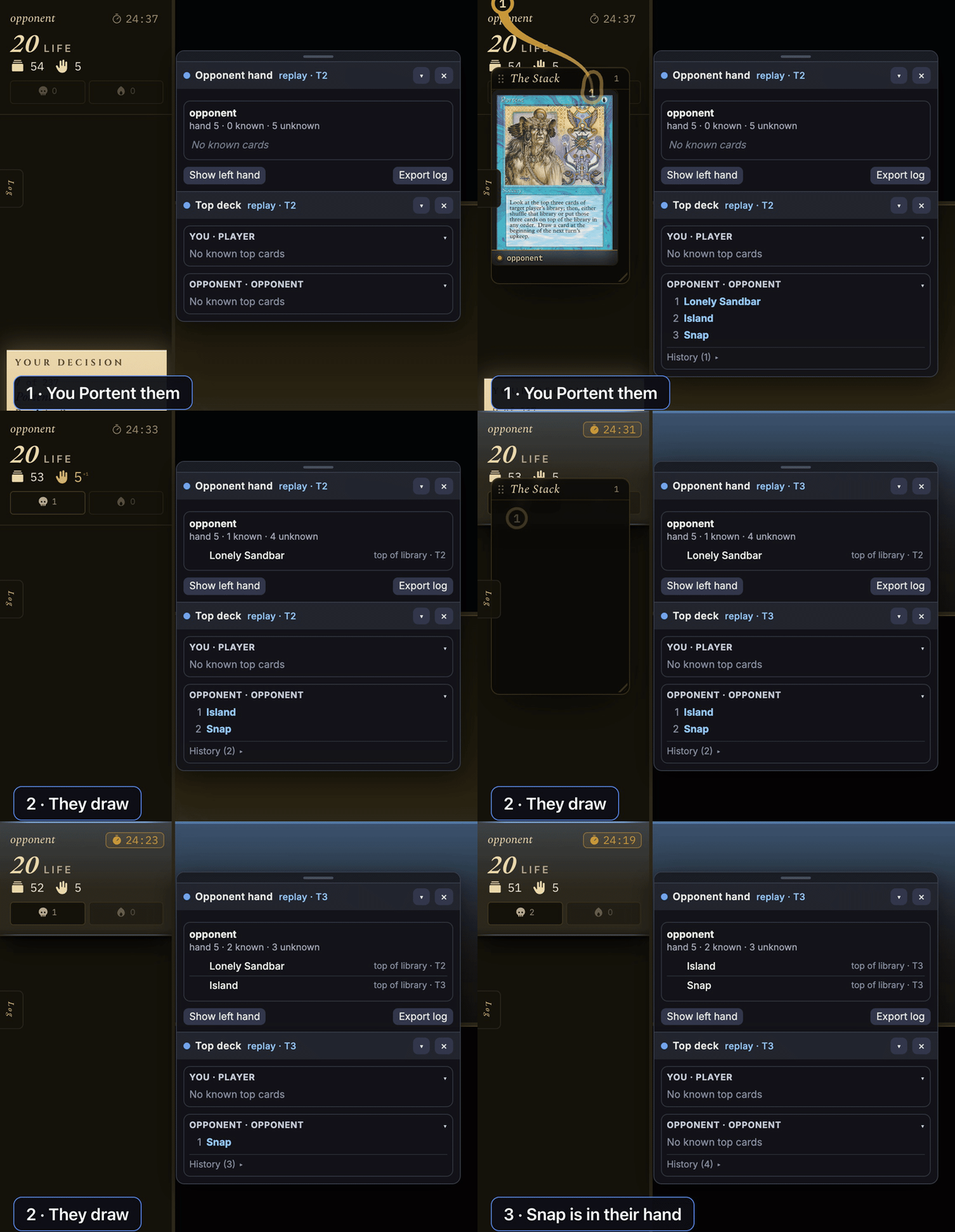
You Portent them. They draw Snap. The dock already knows.

Most trackers only remember a card the game revealed. This one also remembers where it put the cards you saw, so you know what is in your opponent's hand without another look.

  1. Turn 2: you cast Portent on your opponent.You see Lonely Sandbar, Island and Snap, put them back in that order and don't shuffle. The Top deck section now lists all three on top of their library.
  2. Turn 3: they draw.Island in their draw step, then Snap off a Lonely Sandbar cycle. Their draws are face down, but the dock knows what the top card was.
  3. Snap shows in their hand.It is listed as top of library and checked off when they cast it. You can hold back the creature they would bounce, or play into them while they're tapped out.
A real game: the opponent's Portent sits on the stack, then the dock's Top deck section lists Lonely Sandbar, Island and Snap. As the opponent draws Island and then Snap off a Lonely Sandbar cycle the list shrinks, and Snap appears in the Opponent hand section as top of library.

Features

One dock, one section per feature. Each section only uses what the game has shown to you.

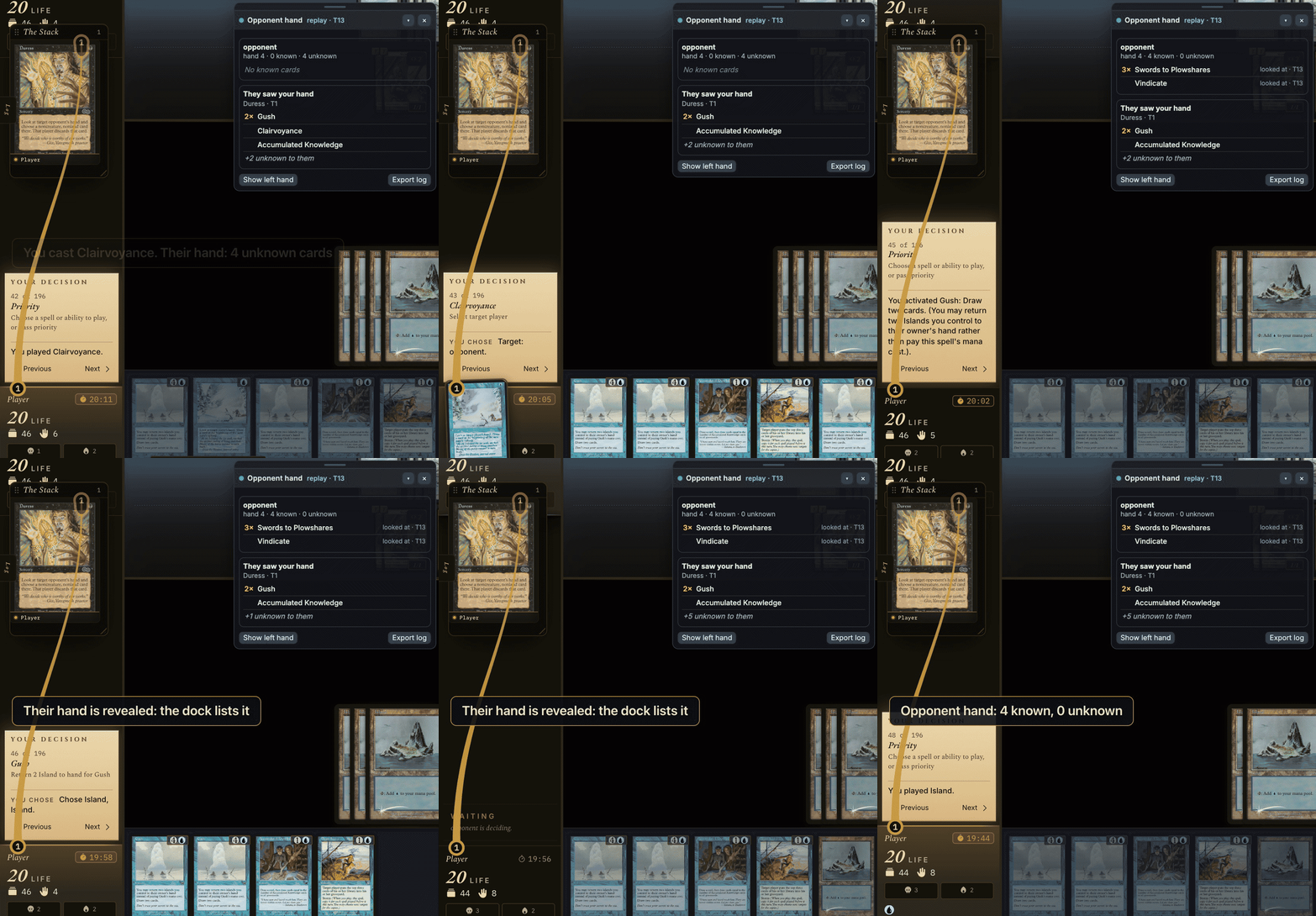
The replay viewer next to the dock: a Clairvoyance is cast on the opponent, their four face-down cards turn face up on the board, and at the same moment the Opponent hand section goes from 4 unknown to 4 known: three Swords to Plowshares and a Vindicate

01 · Opponent

Opponent hand tracker

Remembers the cards you have seen in your opponent's hand, such as after Duress, Thoughtseize or Clairvoyance, and checks them off when they are cast, played or discarded. When they draw a card you saw on top of their library (Portent, for one), that card joins their hand too.

You see hand 4 · 4 known · 0 unknown at a glance, and what has already left their hand. Alt+H shows or hides it.
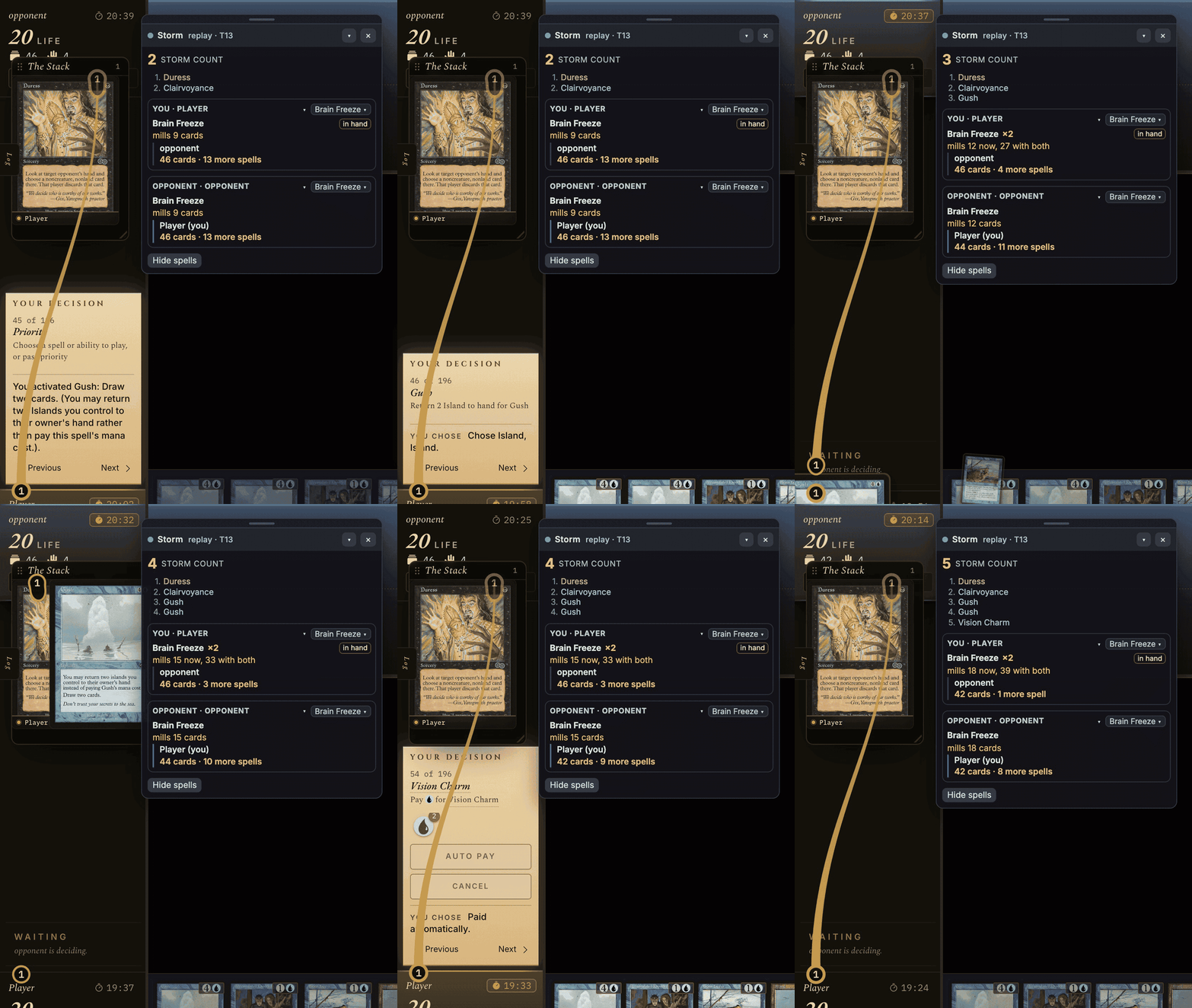
A replay turn: spells go onto The Stack one by one (Gush, Vision Charm) and the Storm count in the dock rises from 2 to 5 while the Brain Freeze mill numbers for both players grow

02 · Storm

Storm counter

Counts the spells cast this turn, lists the storm cards you hold and the ones your opponent could use, and shows what they would do now: cards milled, life lost, and how many more spells are needed.

It lists every storm spell with its copies, so you can check that a Brain Freeze got the right number. On the replay viewer a built-in storm check does the same. Alt+S

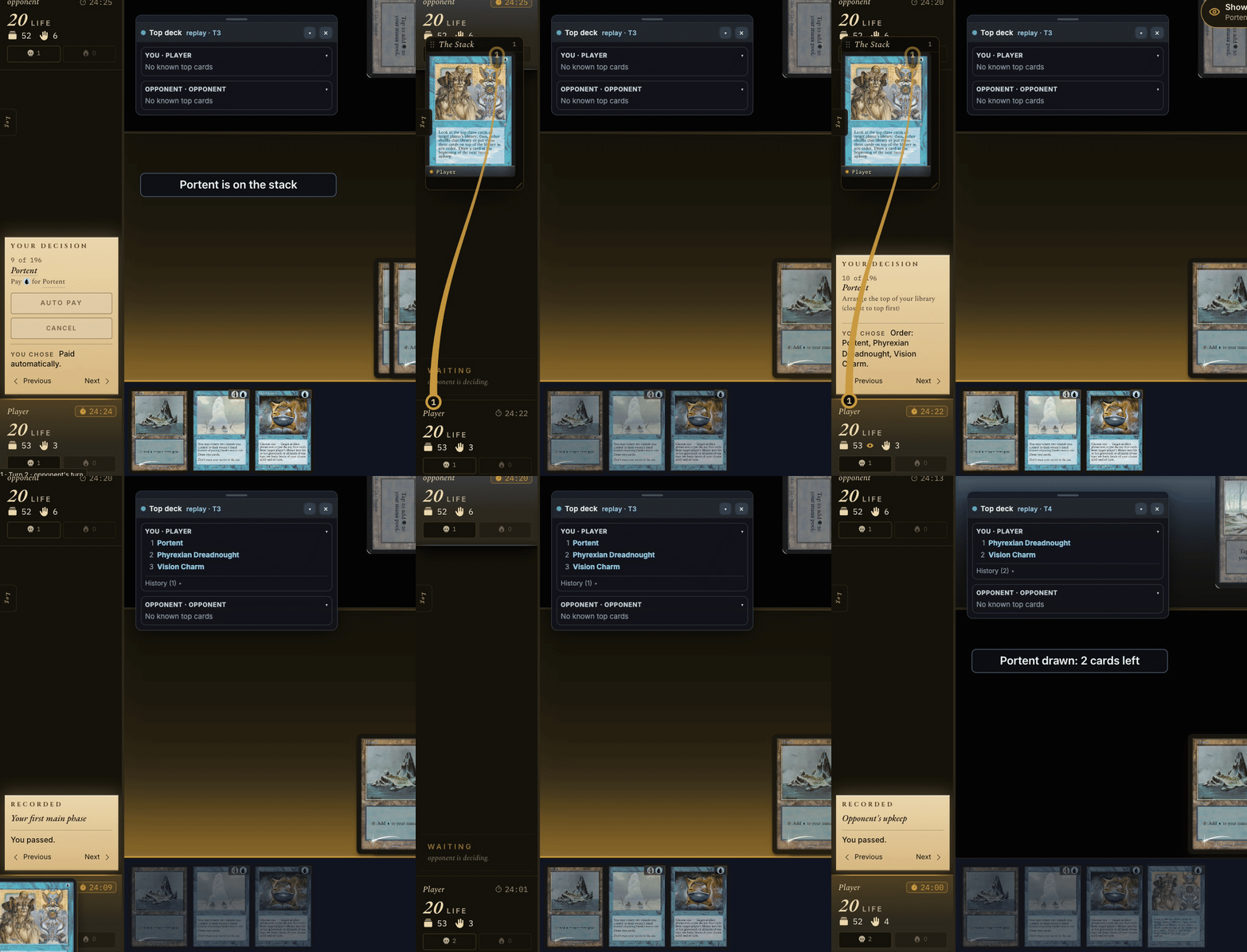
The game board with the Top deck dock: after a Portent the list shows the three cards on top (Portent, Phyrexian Dreadnought, Vision Charm), then it shrinks as those cards are drawn into the hand

03 · Library

Top deck

Shows the cards known to be on top of each library, top first, after Portent, Brainstorm, Ponder, scry, Opt and similar cards, plus a short history of the last changes.

When the opponent scries, you only learn how many cards they kept, so those show as hidden slots. It never guesses. Alt+T

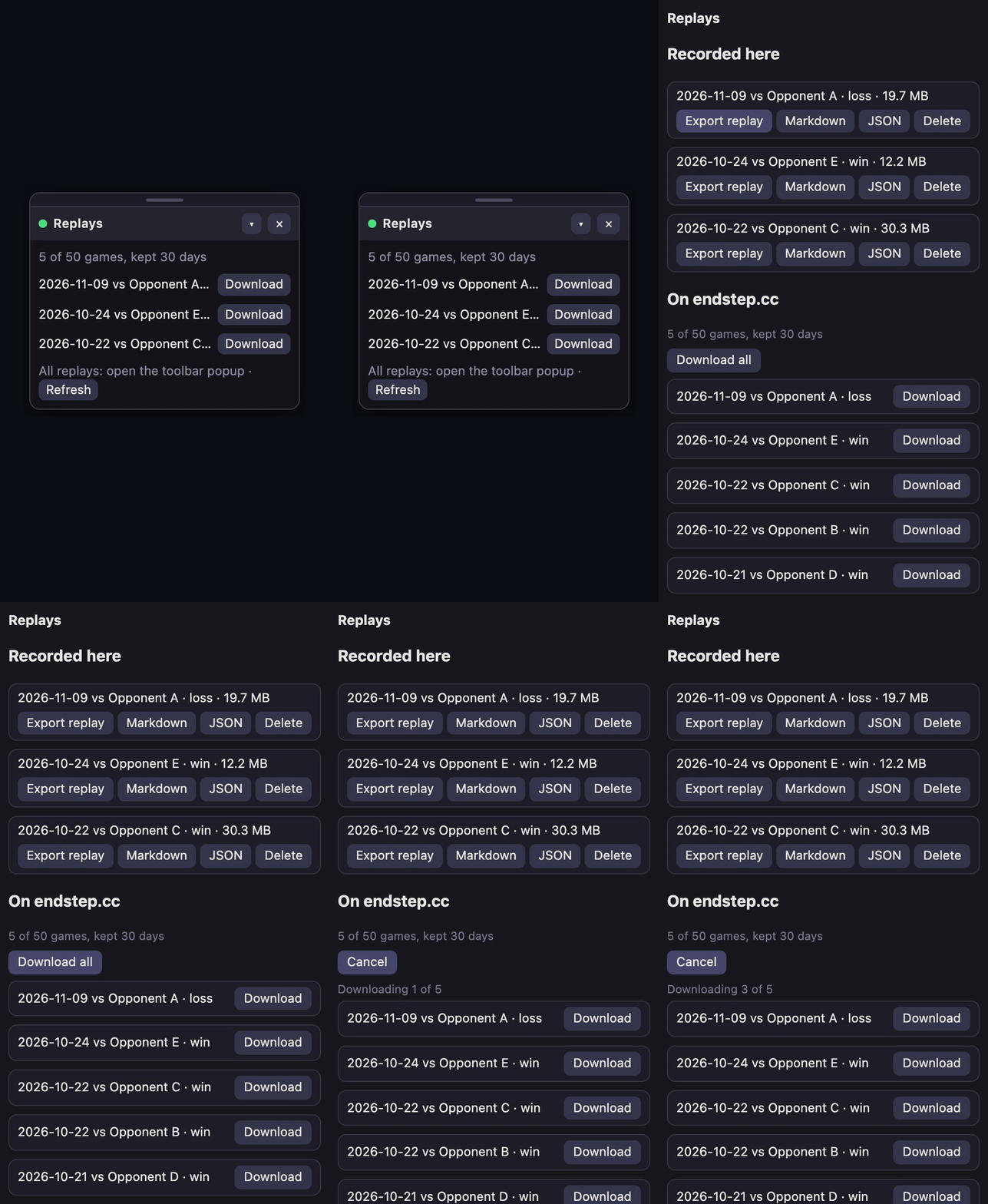
The dock lists the replays endstep.cc keeps with a Download button on each, then the popup lists the games recorded in this browser with Export replay, Markdown, JSON and Delete, and Download all shows Downloading 1 of 5

04 · Replays

Record and export your games

Every game you play is recorded in your browser. Export it as an .esreplay file that opens in endstep's replay viewer with From a file, or as a play-by-play in Markdown or JSON.

The recording takes its format (Pauper, Premodern and so on) from the lobby you started from. The section also lists the replays endstep.cc keeps for you, each with a Download button, and the popup can download them all. Alt+R

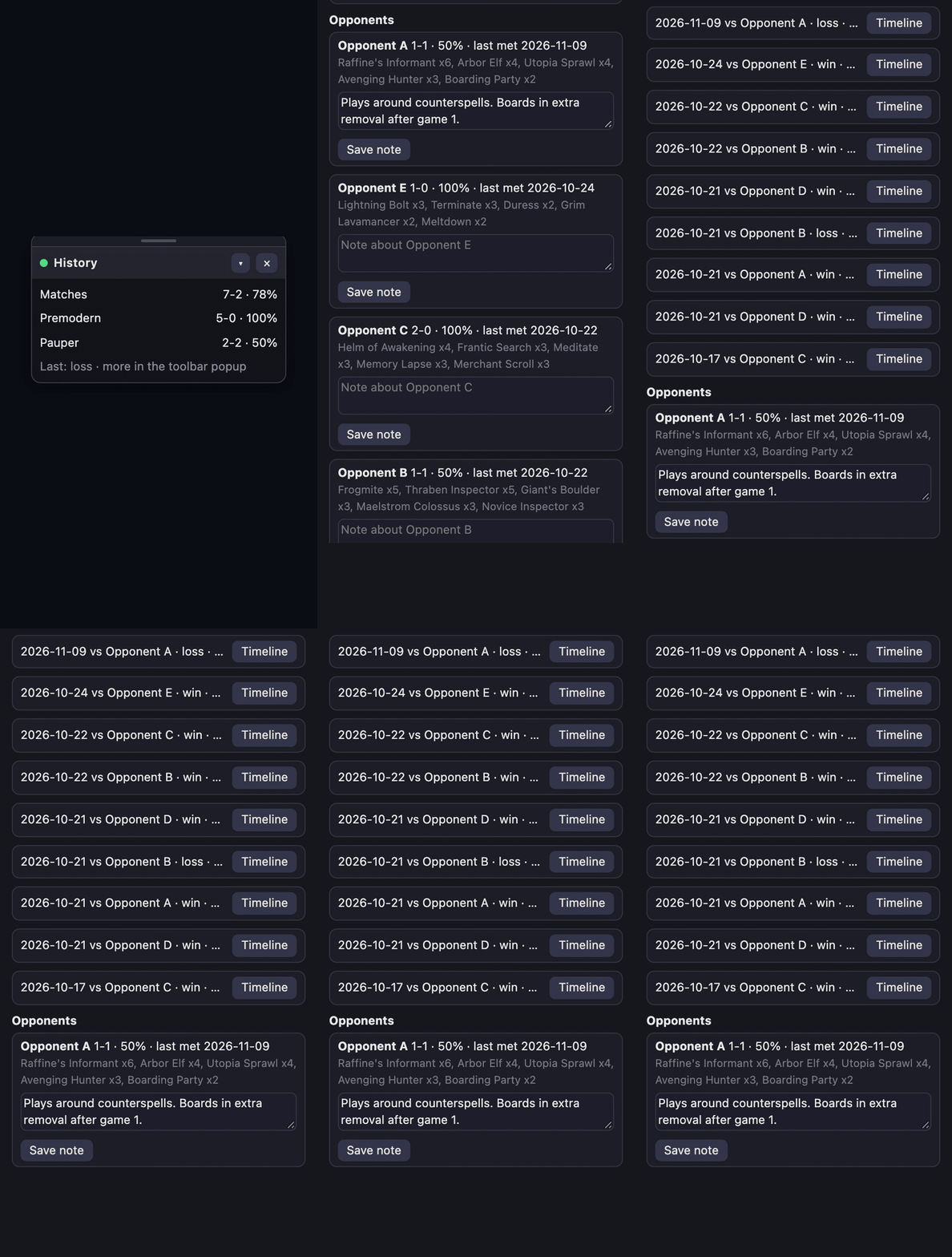
The dock shows the match record by format, then the popup History panel shows win rate by format and opponent deck, the format chips switching the cards played against you, and a game's timeline opening

05 · History

Your record, by format and by opponent

From the games it recorded, the extension shows your win rate overall, by format and by opponent deck, with mulligans and game length. Against someone you have met, you see your record against them and the note you wrote.

The popup opens any recorded game as a timeline, turn by turn, with the sideboarding between games, and counts the cards opponents played against you. Nothing here leaves your browser. Alt+G

06 · Layout

A dock you arrange

Every feature is a section of one dock. Drag the slim bar to move the dock, drag a section by its header to reorder, and fold or hide sections you do not need.

Sections push each other down instead of covering one another, and your layout is remembered.

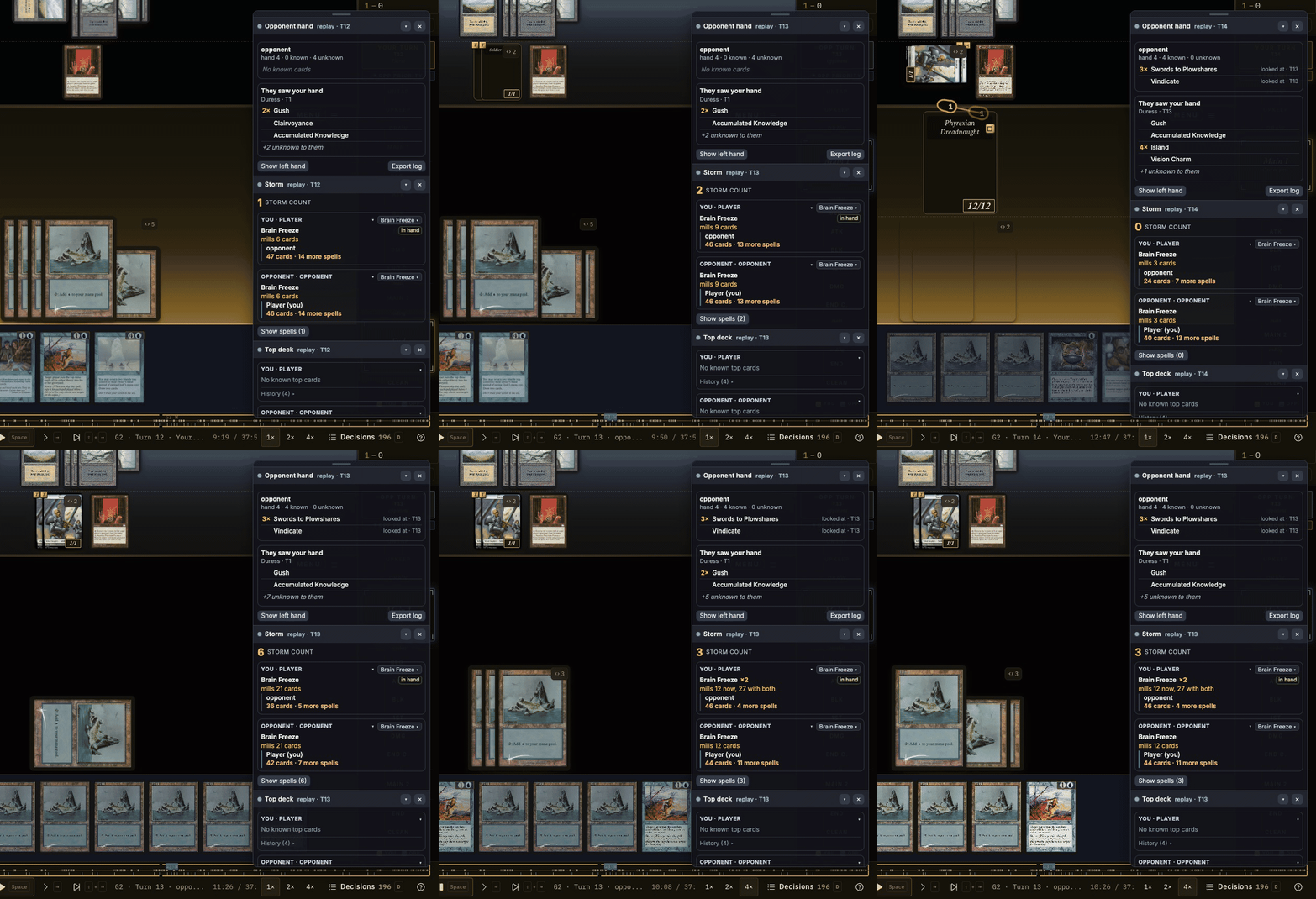
The endstep.cc replay viewer: dragging the position slider back and forth, the dock beside the board updates the opponent hand, storm count and top deck to the frame on screen, then 4x playback

07 · Replay viewer

Works in the replay viewer

Open a match from your history and the dock follows the position slider: play, step or scrub, and each section shows what it knew at the frame on screen.

Handy for reviewing a game afterwards. A replay check also tells you if the tracker disagrees with the game.

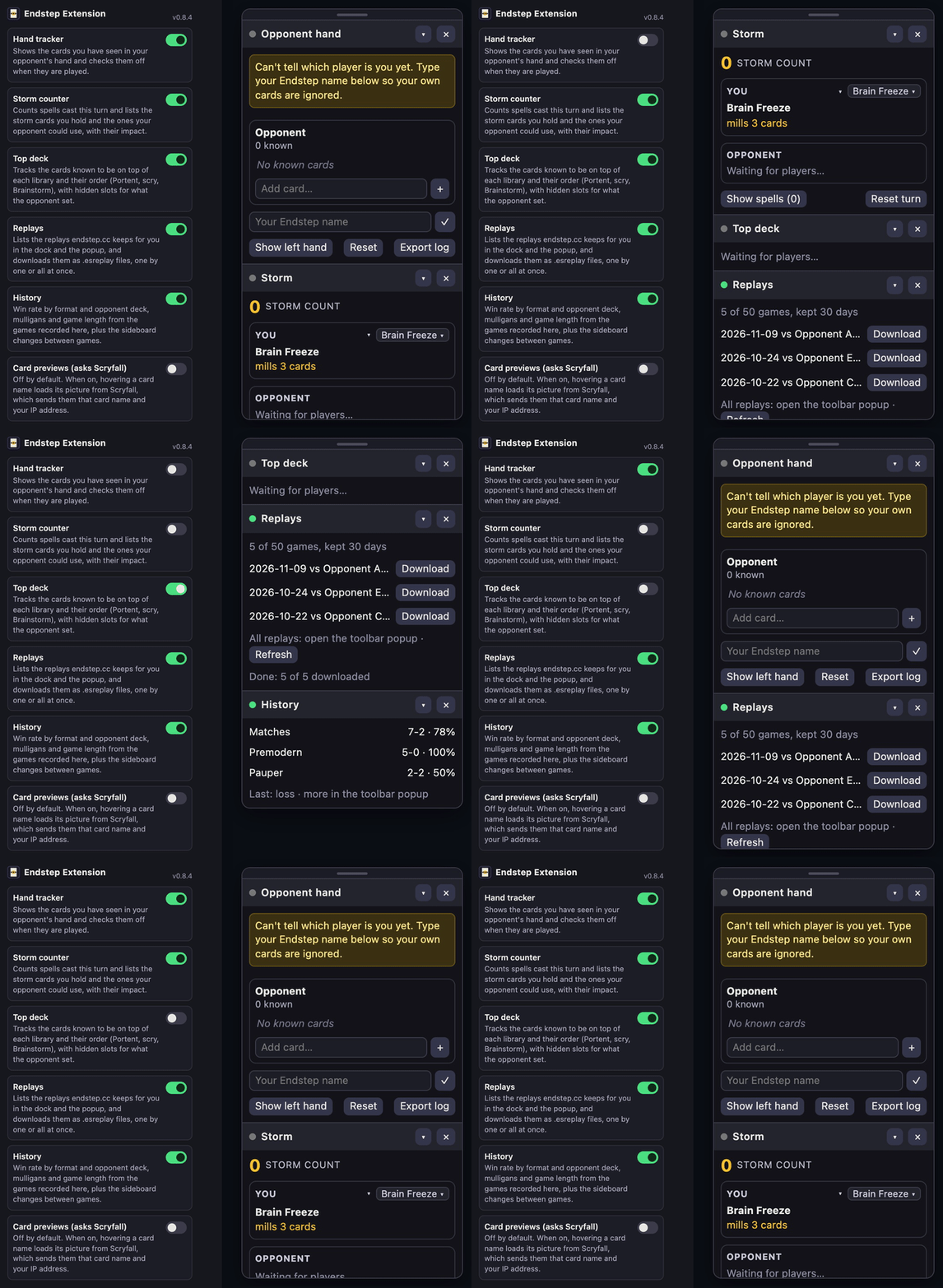
The extension popup: switching the hand tracker, the storm counter and the top deck on and off with one switch each

08 · Settings

Switch features on or off

The toolbar popup has one switch per feature. Changes apply right away to open endstep.cc tabs, with no reload.

Turning a feature off removes its section, and the dock disappears when none is left.

How to use

Install it unpacked in Chrome, then play or open a replay on endstep.cc.

  1. Get the extension folderClick Download above and unzip endstep-extension.zip somewhere you will keep it. It unzips to an endstep-extension folder.
  2. Open chrome://extensionsTurn on Developer mode (top right).
  3. Click Load unpackedPick the extension folder (the one with manifest.json).
  4. Open endstep.ccStart or open a match, or reload the tab if it was already open. The dock appears at the top right.
  5. Drag itUse the slim bar at the top of the dock to move it.
  6. Fold and reorderUse the arrow in a section header to fold it, the cross to hide it, and drag a header to reorder the sections.
  7. Toggle featuresPin the extension from the puzzle-piece menu, click its icon, and use the switches.
  8. Review a replayOpen a match from endstep.cc/history. The dock follows the position slider.
  9. Keep your gamesPlay as usual: each game is recorded. Open the popup on an endstep.cc tab for your recorded games, their timeline and your stats, and to export a replay.

FAQ and limits

What it can and cannot know.

Does it work in live games and replays?

Yes, both. In a live match it follows the game as it happens. In the replay viewer it follows the position slider.

Does it know my opponent's hand?
  • No. It only knows cards that were revealed to you: Duress, Thoughtseize, Clairvoyance, public cards returned to hand, and so on. It also knows cards you saw on top of their library, once they draw them, unless the library was shuffled in between.
  • A card that leaves their hand without a name (a face-down morph, a card put back with Brainstorm) cannot be identified. The panel then says that a card left unseen.
How exact is the top deck?

In replays, your own Portent and scry give the exact order. Live, the extension only sees what the game sends it: after your own Portent it knows the three cards but not the order. For the opponent's scry it only knows how many cards were kept, shown as hidden slots.

Is it official?

No. It is an unofficial, independent companion extension and is not affiliated with endstep. It reads what the page receives, and a copy of your own sideboard choice. It never sends or changes anything in the game.

Where are my games and notes kept?
  • In your browser only. The newest 30 recorded games, your notes and your settings are stored by the extension and are not uploaded anywhere.
  • To list and download your replays it asks endstep.cc, as the site itself does. Card previews are off by default. If you turn on “Card previews (asks Scryfall)” in the popup, hovering a card name loads its picture from Scryfall, which sends that card name and your IP address to Scryfall. With it off, nothing is sent to Scryfall.
  • Login tickets are never stored, and they are removed from the debug log you can export.
What does it need?

A Chromium-based browser (Chrome) with Developer mode on. It only runs on endstep.cc and stores its settings and your recorded games in your browser.